
Networking Basics
A network can be as simple as a pc and an internet router connected together, or as complicated as hundreds or thousands of computers connected together. The internet is the largest computer network in the world. But the internet is actually built of thousands or perhaps even millions of smaller networks, all joined together with routers.
A basic router has an internal IP Address in a set range, and an external IP Address allocated by the Internet Service Provider (ISP). An internal IP Address range can have up to a maximum of 254 network devices. A router can also be referred to as a Gateway Device, or just the Gateway, because it is the gateway from one network to another network.
A router can be a small wireless box with one phone line in and one network cable out, or a complete PC with multiple phone lines in and multiple network connections out. Each phone line would normally be a separate internet connection with completely different IP Addresses. This is also true for each of the internal network connections out.
The traffic flow is then managed using a combination of router IP Addresses information and the use of a software firewall. The router IP Address information is stored in a Routing Table, and any information is shared between routers using the Routing Internet Protocol (RIP) Protocol. The Routing Table stores a list of contactable routers that join different networks, as well as response times, which are relevant if there is more than one route to the same network.
The firewall is a list of allowable rules that determine if traffic that is passed through the router is allowed to reach the destination point. This allows devices or types of traffic to be isolated in the network, either from internal to external or from the Demilitarized Zone (DMZ) to the internal network. It also allows certain types of traffic to pass from the internet to a set location on the internal network. For example, emails pass from email server to email server using the SMTP protocol, which uses port number 25. If you have an internal email server, then port 25 must be forwarded from the router or gateway to the email server IP Address. You can allow either one port or a range of ports, e.g. 21-23, to be forwarded from the router to the internal web server. this would now allow for FTP traffic in and out of the Web Server. The other way round it is to use the DMZ. The DMZ is accessible from the internet but also accessible from the internal network. Basically, when a request to the router is made from the internet, if there is no firewall rule enabled, then the request gets forwarded to the IP Address of the device specified in the DMZ on the router. This technically means that you need some kind of firewall on that device too.
A DNS Server must also be present on the internal network, and this is normally done by the router. The DNS Server accepts name resolution requests and resolves them to either internal devices or internet locations.
A DHCP Server is normally present on a router too. A DHCP Server accepts requests for IP Addresses from network devices and allocates and records them. These details are then passed on to the DNS Server to help resolved requests and maintain network connectivity.
That's about it for a basic overview of how an IP network actually works. If you are still unsure, have a quick search on Google and i can pretty much guarantee that you will find the answer to your question.
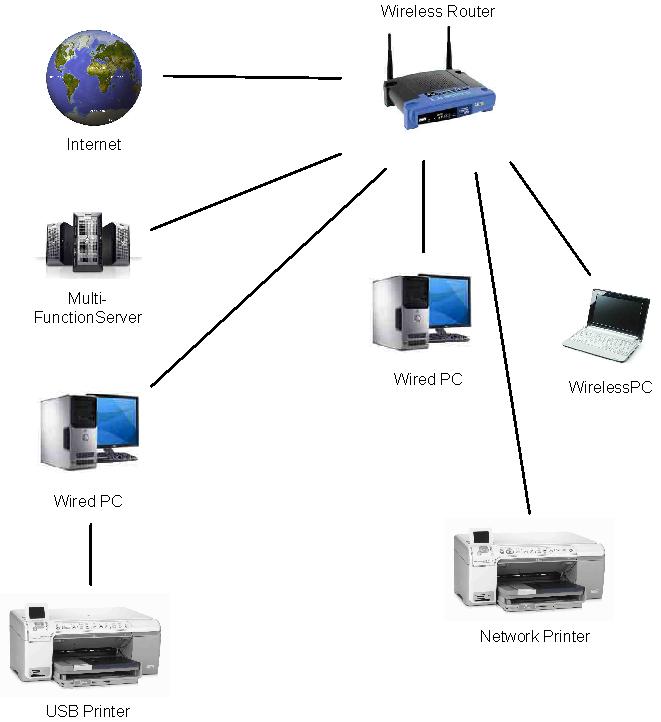
Below are some diagrams of different network infrastructures.
There is one other technology that I could spend hours justifying why I love it so much. This technology is called Infrastructure Virtualization. Think of it as running more than one PC on the same PC at the same time, as if they were all separate independent PCs. In short, this means less physical servers, quicker system backup and recovery times, and less overall costs thus less company expenditure on IT in general.
Below the diagrams showing physical infrastructure configurations are diagrams showing different Infrastructure Virtualization configurations.
Basic or Home Network Configuration:-
Small-Business:-
Large Business:-

Basic Infrastructure Virtualization:-
Complex Infrastructure Virtualization:-